iSharing: GPS Location Tracker
- 4.6
- Rating
- 10.00M
- Installs
- Free
- Price

 Analysis by App-foxy
Keeping track of family members can be reassuring, but location sharing only works well when it is simple, mutual, and used with clear boundaries. After spending time with iSharing: GPS Location Tracker, I see it as a practical communication app for families who want a shared view of where their group is, rather than as a replacement for a full emergency service or a general-purpose messaging platform. Its strongest quality is focus: it brings live location sharing and family-oriented tracking into one place without making the experience feel like a complicated mapping project.
That focus also explains its limits. The app is most useful when everyone involved agrees to use it and keeps the necessary phone settings working. It is less suitable for someone who wants completely passive tracking, highly detailed navigation, or a private map that never involves other people. My overall view is positive, especially for parents, couples, and small family groups, but I would treat it as a coordination tool rather than a guarantee of safety.
How iSharing feels in everyday family life
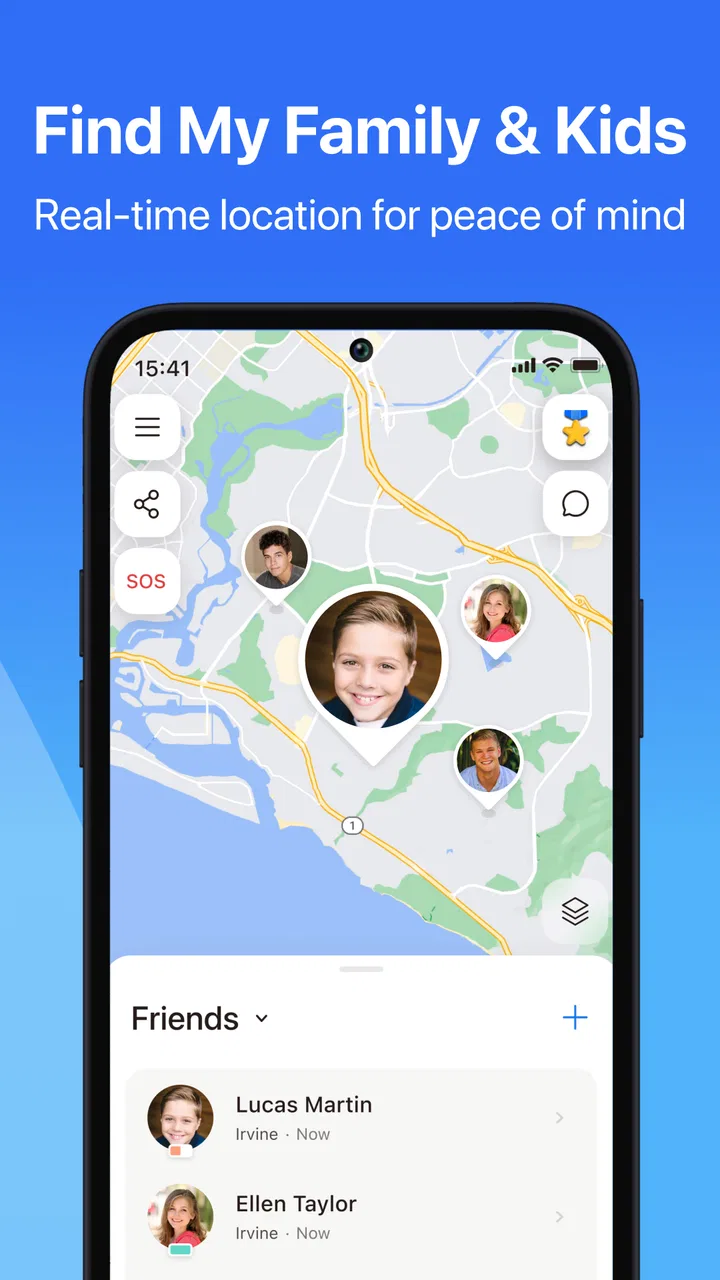
The basic idea is easy to understand. A family member shares their location, and the group can check where people are through the app. That can remove a surprising amount of unnecessary messaging. Instead of repeatedly asking whether a teenager has left school, whether a partner is on the way home, or whether an older relative has arrived, I can use the shared map as a quick reference and send a message only when something genuinely needs discussion.
You May Also Like

 AccuWeather: Weather Radar
AccuWeather Review: A Quick, Clear Forecast for Everyday Decisions
For everyday plans, the best forecast is the one you can understand quickly. AccuWeather makes rain timing, radar, and local conditions easy to act on, with a few trade-offs.

 Hill Climb Racing
Why Hill Climb Racing Still Turns Crashes Into One More Run
A tiny car, a bumpy hill and one more upgrade: Hill Climb Racing keeps resurfacing because its simple chaos makes every near-miss feel personal.

 AliExpress - Shopping App
AliExpress Makes Global Shopping Feel Personal, but Shoppers Bear the Risk
AliExpress turns a global marketplace into a pocket-sized discovery engine. Its reach is useful, its shopping loop compelling, and its trade-offs easy to miss.

 Lords Mobile: Kingdom Wars
Lords Mobile Is a Kingdom-Building Routine, Not a Quick Match
A case-by-case verdict on the building, battles, device demands, and social commitments that make Lords Mobile rewarding for some players and exhausting for others.

 PDF Scanner app - TapScanner
TapScanner Makes Paperwork Easier to Capture, Check, and Share
TapScanner makes scanning with a phone feel less like a rescue operation and more like a dependable step in getting work done. Its capture tools are useful, though not flawless.

 Block Blast!
 Shows How Much a Puzzle Game Can Leave Out
A quiet grid game shows why puzzle players increasingly value instant clarity, repeatable skill and low-pressure play—and where the genre still needs to catch up.
More From Our News Desk
View All News


In a realistic weekday scenario, a parent might leave work while a child is traveling home and another family member is running an errand. iSharing gives the household one place to check the situation. If the child is still moving along the expected route, there is no need for several “Where are you?” messages. If plans change, the family can respond to that change instead of guessing. That small reduction in uncertainty is where the app earns its place.
I also like that the app belongs to the communication category rather than presenting itself as a specialist navigation tool. The purpose is not to replace a map app for driving directions. It is to help people stay connected through location context. That distinction matters because it sets a more realistic expectation: you open it to understand where your group is, not to plan every turn of a journey.
The developer is iSharingSoft, inc., and the app has been available since June 16, 2012. Its long presence in this space is reflected in the broad audience around it: the listing shows a 4.6 average from around 230 thousand ratings, with more than 10 million installs. Those figures do not prove that every family will have a smooth experience, but they do suggest that the concept has become familiar to many people.
The useful part is the shared routine, not constant checking
Location apps can encourage anxious habits if people treat the map as something to watch continuously. I found iSharing more sensible when used at agreed moments: before a child leaves school, when someone is traveling late, or when a family member is expected at a destination. That approach keeps the app helpful without turning ordinary movement into a minute-by-minute report.
A good setup starts with a conversation about who will share location, when it should be checked, and what counts as a genuine concern. This is especially important with older children and teenagers. The technology may be straightforward, but trust is not something an app can create. In my experience, the service works best when the family agrees that location sharing is for coordination and reassurance, not for silently monitoring every decision.
There is also a practical advantage to having a dedicated family locator instead of scattering information across individual messages. A text such as “I’m nearly home” becomes outdated quickly. A shared location view gives more useful context when plans shift. At the same time, I would not assume that a map alone explains everything. A displayed position does not tell me why someone stopped, whether they are safe, or whether their phone is still usable.
What makes it more useful than a basic map share
A conventional map application can often share a location, but that sharing is usually tied to a particular trip or a one-off message. iSharing makes more sense for a continuing family circle. That difference is valuable for households that want an ongoing arrangement instead of repeatedly creating new links or sending fresh updates.
The trade-off is that a dedicated service requires more commitment from the group. Everyone needs to understand the app, join the relevant family circle, and keep using it. A one-time map share may be quicker when I only need to tell a friend where to meet me. For a recurring family routine, however, a permanent shared arrangement is less cluttered and easier to revisit.
Compared with ordinary messaging apps, iSharing puts location at the center rather than treating it as an attachment to a conversation. Compared with a navigation app, it is better for seeing people than for finding a route. Compared with relying on phone calls, it can answer a simple whereabouts question without interrupting someone. None of these comparisons makes it universally better; they show where its design is most appropriate.
Small habits that improve the experience
One useful habit is to check the app before sending a question, then ask a specific follow-up only if the map leaves something unclear. This avoids turning location sharing into a stream of repetitive messages. Another is to review the family circle whenever circumstances change. A former household member, a temporary caregiver, or a guest should not remain included simply because nobody remembered to tidy the group.
I would also avoid interpreting an unchanged position too quickly. A phone may be indoors, stationary, or in an area where location updates are less helpful. If someone appears not to have moved, the right next step is a call or message, not an immediate conclusion. This is one of the most important practical limitations of any location tracker: a map is useful context, not proof of a person’s condition.
For travel days, I find it more useful to agree on checkpoints than to stare at the map. For example, a family can decide that the traveler will share an update before departure and again after arrival. That creates a clear routine and reduces the temptation to treat every small delay as an emergency. It also makes the app easier for the person being tracked, because they know what the family actually expects.
Where the app helps, and where it creates friction
I find the main trade-off is that a shared map can simplify routine coordination while also creating expectations that every phone will always show a clear, current position. In this section, I’d weigh that convenience against the setup, privacy conversations, and occasional need to contact someone directly; next, I’d look at which family routines make that effort worthwhile.
The strongest case is everyday reassurance
Parents are likely to appreciate the app when children begin traveling independently. The value is not only knowing a location; it is being able to replace repeated check-in messages with a calmer routine. Couples can use the same approach when coordinating commutes or late arrivals. Families caring for an older relative may also find a shared location view useful for agreed travel periods, provided the arrangement is respectful and the relative is comfortable with it.
It can be particularly handy for groups with changing schedules. If one person is shopping, another is collecting a child, and a third is returning from work, a shared map can prevent crossed messages. I do not need to ask everyone for an estimated arrival time before deciding whether to start dinner or leave the house. I can look for context, then communicate when a decision actually depends on more information.
The app is free to install, which makes trying it with a family group relatively easy. The listing also identifies it as suitable for Everyone, while optional in-app purchases range from $2.99 to $129.99 per item. I would make sure every member understands which parts of the experience are included and which may involve a purchase before building the service into a household routine. A free starting point is welcome, but the presence of optional purchases means the family should not assume that every useful element will remain part of the no-cost experience.
The current version is 12.11.8.4 and it requires Android 7.0 or later. That makes checking device compatibility an important first step for families using older phones. If one person cannot install or properly run the app, the shared system becomes uneven. In that situation, a simpler method already supported by everyone’s devices may be more practical than asking one family member to replace a phone just for location sharing.
The meaningful weakness is dependence on cooperation and phone conditions
My biggest reservation is not the map itself; it is the chain of conditions behind a trustworthy location update. The person must agree to share, the phone must be available, and the app must be able to provide a useful position. A low battery, a forgotten phone, a poor connection, or changed device settings can make the picture incomplete. That is normal for this kind of service, but it is easy for families to forget when they are worried.
This also means the app is not a substitute for direct contact in a serious situation. If someone is overdue, vulnerable, or possibly in danger, I would call them and use the appropriate local emergency resources rather than relying on a map screen. The app can support a safety routine, but it cannot confirm that a person is well simply because a location appears.
Privacy is another area where convenience needs discipline. A family locator can feel caring in one relationship and intrusive in another. I would not install it on someone else’s phone without their knowledge, and I would not use continued access as a reason to demand explanations for normal movements. The best arrangement is transparent: everyone knows who can see the location and why the sharing is being used.
There is also a social friction that technical reviews often overlook. A parent may see the app as reassurance while a teenager sees it as surveillance. If that disagreement is ignored, the service can create more conflict than it removes. Setting limits, such as sharing during travel rather than treating the map as an all-day attendance record, can make adoption more realistic.
Who should choose it, and who should look elsewhere
I would recommend iSharing to families that want a standing location-sharing routine and are willing to discuss consent and expectations first. It is a good fit for parents coordinating children’s journeys, couples managing different schedules, and small groups that regularly need to know whether someone is on the way. The strongest users are not necessarily the most technically confident; they are the people who value a single, repeatable family workflow.
I would be more cautious for someone who only needs to share a location once. In that case, a familiar map or messaging app may involve less setup. I would also look elsewhere if the main requirement is turn-by-turn navigation, detailed trip planning, or a professional fleet-style tracking system. iSharing’s appeal is its family-centered communication role, not deep route management.
It may also be the wrong choice for a household that cannot agree on privacy. No tracker can solve a trust problem, and installing one in the hope that it will do so may make the problem worse. Likewise, families with incompatible or very old devices should check the Android requirement before inviting everyone into the same arrangement.
For iPhone and Android households, I would compare the actual needs rather than choosing based only on platform. The important questions are whether everyone can participate, whether the family wants ongoing sharing, and whether the cost of any optional features fits the household budget. A service that one person refuses to use consistently is less useful than a simpler alternative that the entire group understands.
My final view after using it
iSharing: GPS Location Tracker succeeds because it turns a recurring family question into a shared reference point. I found it most convincing when used to coordinate ordinary life: school journeys, commutes, errands, and expected arrivals. It reduces unnecessary interruptions and gives family members a little more confidence when plans are spread across different places.
Its limitations are just as important. Location can be incomplete, the app depends on cooperation and working phones, and the presence of a map should never replace a call when something feels wrong. Optional purchases also deserve attention before a family commits to a particular setup. These are not reasons to dismiss the app, but they are reasons to use it thoughtfully.
With a 4.6 average and a large installed audience, it is clearly a well-established option in family location sharing. My recommendation is specific: try it if your household wants an ongoing, consent-based way to coordinate people, and agree on sensible boundaries before turning it on. Skip it if you need one-off sharing, detailed navigation, or a solution for a relationship that lacks trust. Used for the right purpose, it is a convenient communication app; treated as an infallible safety system, it promises more than any phone-based tracker can deliver.
FAQs for iSharing: GPS Location Tracker
01What features does iSharing: GPS Location Tracker offer?
iSharing provides real-time GPS location tracking, allowing users to see the whereabouts of family and friends on a private map. It includes features like location history, alerts when someone arrives or leaves a designated area, and an SOS panic button for emergencies. It’s designed to enhance safety and communication among users.
02How accurate is the location tracking in iSharing?
The accuracy of iSharing’s GPS tracking depends on several factors, including the quality of the GPS signal and the device being used. Generally, the app provides precise location tracking, but users should be aware that accuracy can be affected in areas with poor GPS reception, such as dense urban environments or rural areas.
03Is iSharing safe to use in terms of privacy?
iSharing is designed with user privacy in mind, offering features like private maps and the ability to control who can see your location. The app requires permission to access your location data, and users have the option to manage these settings to ensure their data is only shared with trusted contacts.
04Does iSharing drain battery life significantly?
Like many GPS-based applications, iSharing can have an impact on battery life. However, the app is optimized to minimize battery usage as much as possible. Users can manage settings such as location update frequency to balance between battery conservation and real-time tracking needs.
05Is iSharing free, or does it require a subscription?
iSharing offers a free version with essential features, but users can opt for a premium subscription for additional benefits such as an ad-free experience, unlimited location updates, and priority customer support. The subscription model allows users to choose the service level that best fits their needs.
Pros
- Real-time location sharing feature.
- Easy-to-use interface for all ages.
- Battery-friendly operation mode.
- Instant alerts for location changes.
- Cross-platform compatibility.
Cons
- Requires constant internet connection.
- Privacy concerns with location sharing.
- Limited features in free version.
- Ads in non-premium version.
- Occasional location accuracy issues.

iSharing: GPS Location Tracker
Gallery